
privat:programmieren:mtadmob_plugin:mtadmob_plugin
Dies ist eine alte Version des Dokuments!
- Installiere das Paket MauiMTAdmob
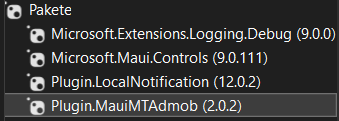
Wichtig ist die version 2.0.2 da mit anderen konflikte auftretten - In der AndroidManifest.xml folgenden code einfügen
- download
<application
  android:allowBackup="true"
  android:icon="@mipmap/appicon"
  android:roundIcon="@mipmap/appicon_round"
  android:supportsRtl="true">
  <meta-data
    android:name="com.google.android.gms.ads.APPLICATION_ID"
    android:value="ca-app-pub-9661522762240356~5397188219"/>
</application>
- download
android:value="ca-app-pub-9661522762240356~5397188219"/>
kommt aus der ADMOB-Seite
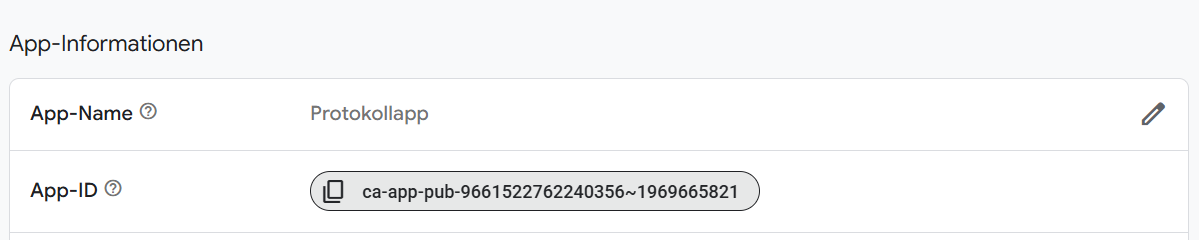
- Unter
- download
            builder
                .UseMauiApp<App>()
                //.ConfigureSyncfusionPdfViewer()
                .UseMauiMTAdmob() // <--- HIER hinzufügen
                .UseLocalNotification()
                .ConfigureFonts(fonts =>
                {
                    fonts.AddFont("OpenSans-Regular.ttf", "OpenSansRegular");
                    fonts.AddFont("OpenSans-Semibold.ttf", "OpenSansSemibold");
                });
- Dann legst du eine Datei CrossPlatformAdBanner.cs unter Controls an
- download
using Microsoft.Maui.Controls;
using Plugin.MauiMTAdmob.Controls;
using Plugin.MauiMTAdmob.Extra; // ← hier ist BannerSize definiert

namespace DimCalc.Controls;

public class CrossPlatformAdBanner : ContentView
{
    public CrossPlatformAdBanner(string AdsId_in)
    {
#if ANDROID
        // Hier läuft AdMob
        Content = new AdMMTAdView
        {
            AdsId = AdsId_in, //"ca-app-pub-9661522762240356/4084106545",
            HeightRequest = 50,
            AdSize = BannerSize.AnchoredAdaptive
        };

#else
        // Windows → AdSense via WebView
        Content = new WebView
        {
            HeightRequest = 120,
            Source = new UrlWebViewSource
            {
                Url = "https://deinedomain.de/ads/banner.html"
            }
        };
#endif
    }
}


privat/programmieren/mtadmob_plugin/mtadmob_plugin.1767089373.txt.gz · Zuletzt geändert: von vitalij